


DICE Access
1.04.00 Reviews
App Specs
- Version
- 8.7
- Updated On
- License
- Free
- Downloads
- 10,000+
- Developer
- DICE FM
- Categories
- Events
- Platform
- Android
Screenshots
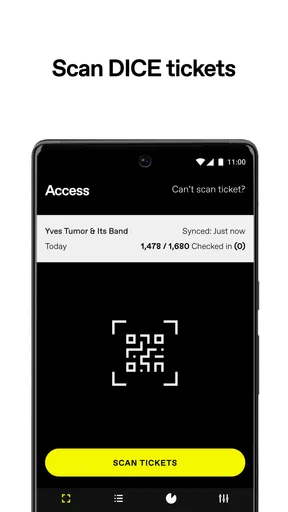
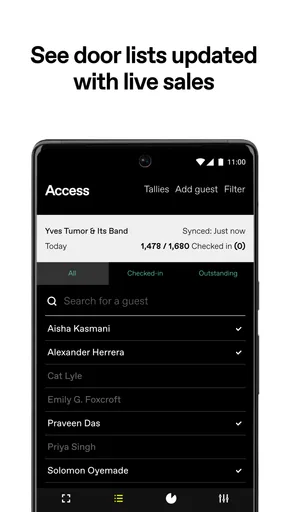
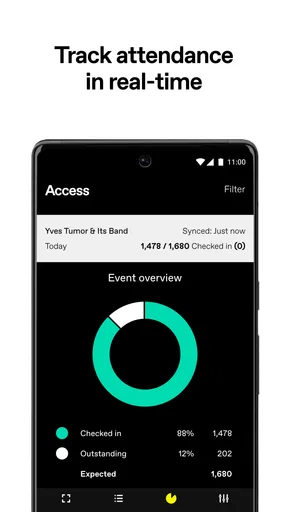
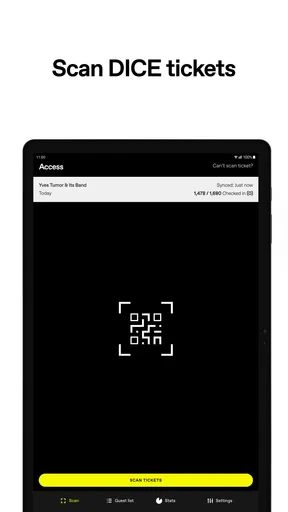
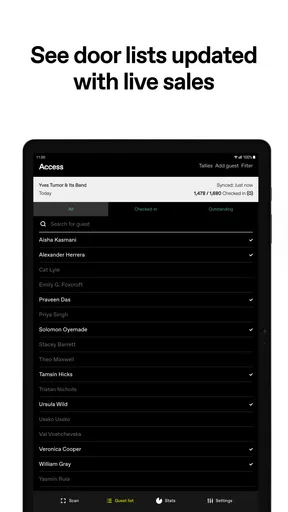
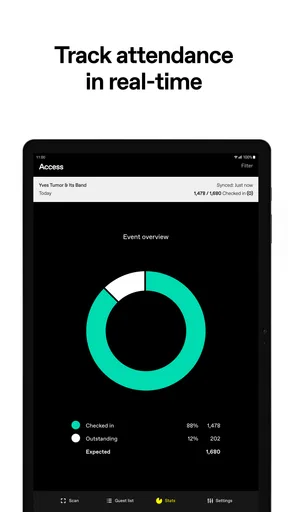
 Analysis by AppCompare
I first approached DICE Access as a very focused tool rather than a general event app. Its job is to help venues scan DICE tickets, and that narrow purpose shapes almost every part of the experience. If you work at a club, concert hall, or another venue using DICE for admissions, the app can become part of the door team’s routine quickly. If you are simply looking for shows to attend, this is not the DICE product you want.
That distinction matters because the app’s value is operational, not recreational. I would not install it expecting event discovery, ticket purchasing, artist recommendations, or a personal ticket wallet. The useful question is whether it makes entry control dependable during a busy shift. In my experience, a dedicated access tool can be more practical than asking staff to improvise with screenshots, email confirmations, or a standard camera app, but it also creates a new point of failure that has to be managed carefully.
What the first week feels like for a venue team
The first week is where the app makes its strongest impression. A new door worker can understand the basic idea quickly: open the venue’s scanning tool, point the phone at a ticket, and use the result to decide whether the guest can enter. That simplicity is important when the queue is moving, the room is loud, and the person holding the phone may not be a manager or technical specialist.
The best use case is a venue that already relies on DICE ticketing and wants a consistent admission process. Instead of checking names manually or switching between several systems, staff have a purpose-built route for validating tickets. The app’s store summary is brief because the role is brief: it is for venues to scan DICE tickets. I see that narrowness as a strength at the door, provided the venue has already organized its wider event workflow.
A realistic scenario would be a small concert venue preparing for an evening show. One staff member stands at the entrance with a phone, scans each ticket, and lets the rest of the team concentrate on wristbands, guest questions, and crowd movement. When the queue suddenly grows, the value is not a flashy feature; it is reducing the number of decisions the scanner has to make. A dedicated screen and a defined process are easier to teach than a collection of improvised checks.
There is also a useful training advantage. Because the application is not trying to be a complete venue-management suite, new staff can focus on the admission task instead of learning unrelated menus. I would still give every worker a short practice run before the doors open. The important lesson is not only how to scan, but how to react to a rejected or unclear ticket without holding up the entire line.
That last point is where expectations should stay realistic. A scanner can identify a ticket result, but it does not replace human judgement at the entrance. Staff still need a plan for guests who show a damaged screen, arrive with a phone that cannot display the ticket properly, or believe they bought admission for the wrong event. The app can support the decision; it cannot solve every customer-service problem around it.
Worth Reading Before You Choose

EA SPORTS FC Mobile 26 Is a Bigger Football Game, but It Takes Time

Flipboard Shows What News Apps Must Do Beyond the Feed

Switching to Android Auto Means Rethinking Your Driving Routine

Google Calendar Makes a Crowded Week Easier to Manage

Ludo King Makes the Most of the Minutes Between Plans

Baby Panda World Brings Quick Play to Modern Phones, but Its Game Library Feels Busy
The application is free, which makes testing easier for a venue deciding whether it fits its operation. It is also aimed at an Everyone audience, so the basic age classification does not make it feel like a specialist tool restricted to a narrow group of users. Still, the practical audience is venue staff, and a free download should not be mistaken for a complete admissions strategy.
Where it beats improvised ticket checks
Compared with asking guests to show an email, a screenshot, or a confirmation page, a dedicated scanner gives the door team a clearer workflow. It encourages staff to treat admission as a repeatable process rather than a visual guessing game. That is particularly helpful when several people are working the same entrance and need to apply the same standard.
It also has an advantage over a generic QR scanner. A normal camera utility may read a code, but reading a code is not the same as validating entry. Venue staff need an application connected to the ticketing context, not merely a string of characters or a web address. That difference is easy to overlook before a busy event, then becomes obvious when the queue is waiting.
My practical tip is to keep the phone dedicated to the admission task during the shift. Avoid using the same device for unrelated staff messages, social media, or personal calls while the queue is active. Even without adding any special equipment, treating the phone as a work tool makes the process easier to hand over and less likely to be interrupted by distractions.
The questions that appear after the novelty fades
One question a venue manager may have is whether this is useful for occasional events or only for a permanent door team. I think it can suit both, but the preparation standard should be different. A regular team can build the scanner into its routine. A temporary team needs a clear briefing, a charged device, and a named person who can handle exceptions. The app does not remove the need for that preparation.
Another question is whether it replaces the venue’s other admission duties. I would not treat it that way. It handles the DICE ticket-scanning part of the process, while staff may still need to manage guest lists, age checks, wristbands, accessibility requests, re-entry, and security decisions separately. The more complicated the entrance, the more important it becomes to define exactly which decision belongs to the scanner and which belongs to a person.
There is also a difference between using it for a quiet early entry and using it during a rush. In a calm setting, staff can pause and investigate an issue. During a rush, every unclear result can create a bottleneck. I recommend assigning one experienced worker to deal with exceptions instead of allowing every scanner operator to leave the queue and troubleshoot independently.
Month-to-month value and the cost of keeping it dependable
After the first few events, the app’s lasting value depends less on discovery and more on repetition. A venue does not need to be impressed by the interface every month; it needs the same basic admission routine to remain predictable. That is a modest form of value, but it is exactly what an operational app should provide.
The current version is 8.7, and the application supports Android devices running version 5.0 or later. For a venue with a mixture of older phones and newer hardware, that broad compatibility can make deployment less disruptive. I would still test the actual devices used at the door rather than assuming that an eligible operating system guarantees a smooth event. A phone can meet the software requirement and still be inconvenient because of its camera, battery condition, screen brightness, or general wear.
Month-to-month usefulness is strongest when the venue runs DICE events often enough for staff to build muscle memory. The scanner becomes part of the opening checklist: prepare the phone, confirm the correct event context, test the entrance position, and brief the team. The application itself may be simple, but the surrounding habit is what creates reliability.
This is one of the less obvious trade-offs. A focused tool can be easier to operate than a broad platform, yet it may be less valuable to a venue that only uses it once in a long while. Infrequent users are more likely to forget the workflow, overlook an update, or discover a device problem immediately before doors open. For them, the app is still useful, but the venue must invest more effort in written procedures and rehearsal.
I would compare it with a venue’s usual alternative in two ways. A manual list gives staff more flexibility for unusual cases, but it is slower and more vulnerable to spelling mistakes or inconsistent judgement. A general ticketing platform may offer a wider set of tools, but switching systems can create confusion if DICE is already the source of the tickets. DICE Access makes the most sense when the venue wants the scanning step to stay close to the ticketing system it already uses.
It is less compelling for a venue that sells tickets through many unrelated services. In that environment, a single-purpose DICE scanner may cover only one part of the door operation, forcing staff to change methods from event to event. A broader admissions platform could be the better long-term choice if the priority is one unified workflow across several ticket providers.
Maintenance is mostly operational, not glamorous
The maintenance burden is easy to underestimate because scanning a ticket looks simple. The venue still has to maintain the device, the staff routine, and the event-day fallback plan. I would keep the scanning phone charged, clean the camera area, remove unnecessary lock-screen obstacles, and check the app before the queue forms. These are ordinary steps, but ordinary failures are exactly what cause avoidable delays.
Device ownership also matters. If a venue passes one phone between departments, the scanner may arrive at the entrance with a low battery, a changed setting, or another app covering the workflow. A dedicated device is more dependable, while a shared device is cheaper and more flexible. That is a real trade-off rather than a flaw in the application itself.
Staff turnover creates another maintenance challenge. A process that feels obvious to a regular employee may not be obvious to a casual worker. I would create a short internal instruction covering the scan, the meaning of a successful result, the response to a problem, and the person to contact. Keeping that instruction next to the event equipment is more useful than assuming everyone will remember the previous shift.
Updates deserve a place in the venue’s routine as well. I would avoid changing the application immediately before a major event unless there is a clear reason, but I would also avoid leaving the device untouched for long periods. The sensible middle ground is to test the app during a quiet period and confirm that the team can still complete the basic scan before relying on it at a packed entrance.
The application’s free price helps reduce the financial burden of maintaining several scanning devices, but it does not eliminate labor costs. Someone still has to prepare the equipment, train the team, and handle exceptions. For a small venue, that human time may matter more than the download cost when comparing this tool with manual admission.
What creates fatigue over repeated use
The first source of fatigue is repetition without enough context. Scanning the same kind of ticket for hours is straightforward, but a worker can become less attentive as the queue continues. A venue should rotate tasks when possible and keep one person responsible for watching the overall flow. The application can make the scan consistent, but it cannot prevent tired staff from rushing through an unclear result.
The second source is exception handling. A smooth scan is quick; a disputed scan can consume several minutes and attract a small crowd. If every issue is handled at the front of the queue, the tool begins to feel slow even when the underlying scan is not the problem. A side position for troubleshooting, plus a supervisor who can make a final call, protects both the guest experience and the scanner operator.
The third is dependence on a single workflow. When a venue becomes comfortable with one tool, it may stop rehearsing what happens when the phone is unavailable or a guest cannot present the ticket normally. I would not build an event plan that assumes perfect conditions. The fallback should be simple and known to the team, without turning every unusual case into an argument at the door.
There is a psychological fatigue too: staff may expect the app to explain every situation. A focused scanner is not a replacement for venue policy. Workers still need to know who can approve a guest, how to treat a duplicate-looking ticket, and when to pause the line. Clear policy prevents the app from being blamed for decisions it was never designed to make.
Who should keep it and who should skip it
I would recommend keeping DICE Access in the regular toolkit if your venue frequently admits guests with DICE tickets and wants a dedicated scanning routine. It is especially suitable for teams that value a quick training curve, use a small number of entrance devices, and can assign someone to manage exceptions. In that setting, its narrow purpose becomes an advantage rather than a limitation.
I would be more cautious if you are an individual concertgoer. The app is not aimed at discovering events or managing your personal night out, so it is unlikely to earn lasting space on your phone unless you are scanning tickets as part of venue work. Installing it out of curiosity would add little value.
A mixed-ticket venue should compare it carefully with a multi-provider admissions system. If the main requirement is one dashboard for every ticket source, DICE Access may feel incomplete. If the main requirement is reliable handling of DICE tickets and the rest of the admission process is already organized elsewhere, the focused approach can be cleaner.
The public response also suggests that expectations should be modest. The app has an average rating of 1.0 from around 68 ratings, with four written reviews. Ratings alone do not explain whether complaints concern a specific device, a particular event setup, or the wider workflow, so I would not treat them as a complete technical verdict. I would treat them as a reason to test the application with the exact phones and staff who will use it before making it central to a high-pressure entrance.
The install count is over 10K, which indicates that it has found a practical audience, but it is not a reason to assume that every venue will have the same experience. A scanning tool is unusually sensitive to local conditions: lighting, network arrangements, device quality, queue design, and staff training all influence how useful it feels.
Does it earn lasting space?
My long-term verdict is conditional but positive for the right audience. DICE Access earns a permanent place in a venue’s working kit when DICE tickets are a regular part of the entrance and the team treats the app as one component of a prepared process. Its lasting value comes from reducing improvisation, not from offering a large collection of features.
I would not call it a universal solution for admissions. It cannot replace a venue’s policies, staff judgement, or backup planning, and it may be the wrong choice for operations built around several ticket providers. The narrow focus can also become frustrating when a venue expects one app to manage every guest type and every exception.
Still, there is something worthwhile about a tool that knows exactly what job it is meant to do. After the novelty disappears, a venue does not need entertainment from its scanner. It needs staff to recognize the workflow, guests to move through without unnecessary confusion, and managers to know where the process ends and human support begins. If your operation matches that description, I would keep it installed and build it into the event checklist. If you are not part of a venue team using DICE tickets, I would skip it and choose an app designed for the audience side of events instead.
Pros
- Quick access to tickets
- event details
- and venue information
- Useful notifications help keep you updated about upcoming events
- Supports secure digital ticket storage on your phone
- Clean interface makes browsing event information straightforward
- Can simplify entry by keeping ticket details in one place
Cons
- Availability and features may vary depending on your event or location
- Requires a stable internet connection for some ticket functions
- Account setup may be necessary before accessing certain content
- Digital-only tickets can be inconvenient if your phone battery runs low
- Some users may find limited event coverage outside supported venues
FAQs for DICE Access
What is DICE Access, and what is it used for?
DICE Access is an accessibility-focused companion app designed to help users manage and use compatible DICE services more easily. Depending on the event, venue, or organization supporting it, the app may provide tools such as accessible ticket information, event details, assistance requests, or entry-related guidance. Its exact features can vary, so users should check whether their chosen venue or event officially supports DICE Access before downloading.
Is DICE Access available for both Android and iPhone?
DICE Access may be offered through mobile platforms supported by the relevant DICE service, but availability can depend on the current app version, region, and event provider. Before installing, check the official Google Play Store or Apple App Store listing to confirm device compatibility, operating-system requirements, and the correct developer. Avoid downloading similarly named applications from unofficial websites, as they may not provide the same features or security protections.
Do I need a DICE account or an event invitation to use DICE Access?
In many cases, users need to sign in with a DICE account or access a service connected to a participating event, venue, or organization. Some features may only appear after a ticket has been purchased, an invitation has been received, or accessibility support has been approved. If you cannot see the expected options, verify that you are using the correct email address and that the event organizer supports the app.
Can DICE Access help with accessibility arrangements at an event?
DICE Access may help eligible users find accessibility information or communicate support needs, but it should not automatically be treated as a replacement for contacting the venue directly. Accessibility policies differ between events, and requests such as wheelchair access, companion admission, captioning, seating adjustments, or step-free entry may require advance approval. Review the event’s instructions carefully and contact the organizer if your needs are not clearly covered.
What should I do if DICE Access is not working at the venue or I cannot access my information?
If the app fails to load, your ticket or event details are missing, or an accessibility request cannot be displayed, first check your internet connection, update the app, and confirm that you are signed into the correct account. It is also wise to keep confirmation emails and identification available. Because venue staff may have limited ability to resolve account problems, contact DICE support or the event organizer before arrival whenever possible.


